SELAMAT DATANG DI JAWA TIMUR JOBFAIR , BLOG JOB SEEKER No.1 di INDONESIA | Agar info Job/lowongan kerja disini selalu Update,Silahkan SUPPORT kami dengan donasi Klik Iklan diblog ini

RapidShare Account

info : last update 28 march 2009

Login : 8211623
password : 8S7D3xKw

+43GB

Login :L 7104268
Pass : QzeANByWDq

+5GB

L : Albertoing
P : UMwelT7767

+10GB

L : jamb0
P : jimbobharry

+9GB

Login: jwinchis
Password: 2P5jfw

+7GB


more account download here
stemapal community


Tips to Increase your harddisk speed

Rabu, 16 Maret 2011

To speed up your hard disk speed we need to configure a special buffer in the computer's memory in order to enable it to better deal with interrupts made from the disk.

This tip is only recommended if you have 256MB RAM or higher.

Follow these steps:

  1. Run SYSEDIT.EXE from the Run command.
  2. Expand the system.ini file window.
  3. Scroll down almost to the end of the file till you find a line called [386enh].
  4. Press Enter to make one blank line, and in that line type
  5. Irq14=4096    Note: This line IS CASE SENSITIVE!!!
  6. Click on the File menu, then choose Save.
  7. Close SYSEDIT and reboot your computer.

Done. Speed improvement will be noticed after the computer reboots.

Update: The most speed improvement is visible with IDE drives, however there are reports that this tweak also does good for SCSI disks. In any case, it won't harm your system, so why not try it yourself and let me know what you find.


[+/-] Selengkapnya...

Speed Up Acrobat Reader Loading


Do u get irritated when acrobat reader takes 5/10 seconds to load when you want to open a pdf document. There is a way to speed up the loading.
1. Go to the installation folder of acrobat reader
(C:\program files\adobe\acrobat\reader\.. whatever)
2. Move all the files and folders from the "plugins" directory to the "Optional" directory. (I repeat.. cut and paste the files NOT copy & paste).
Also make sure that acrobat reader is not open else it will lock the files and not allow you to move the files). Now your acrobat reader will load very fast and almost as good as notepad..

[+/-] Selengkapnya...

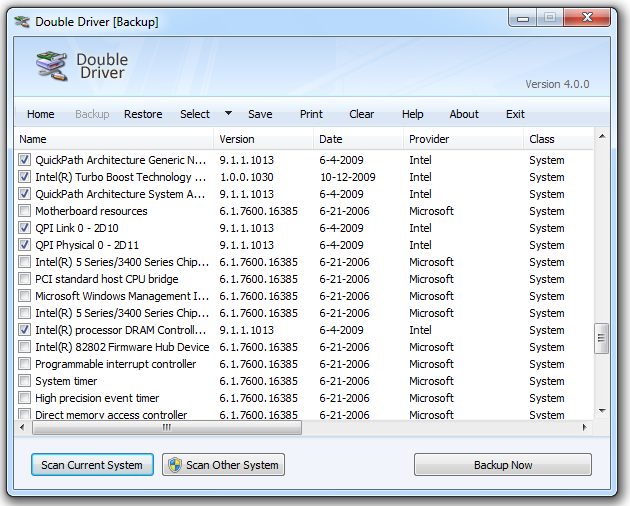
Double Driver | PC driver back up tool


Double Driver is a very simple and useful tool which not only allows you to view all the drivers installed on your system but also allows you to backup, restore, save and print all chosen drivers.

Double Driver analyzes your system and lists the most important driver details such as version, date, provider, etc. All drivers that are found can easily be backed up the application and easily restored at a later point in one go.

Double Driver is freeware.Support Operating System :: Microsoft Windows XP/Vista/7 (32-bit or 64-bit).

Features :
  1. List, save, and print drivers details
  2. Backup drivers from current Windows
  3. Backup drivers from non-live/non-booting Windows
  4. Backup drivers to structured folders, compressed (zipped) folder, and self-extracting capability
  5. Restore drivers from previous backup
  6. Available in GUI and CLI application
  7. Portable (no installation required)
you can get it for free from own website on this link


[+/-] Selengkapnya...

Prestashop themes ninabobo v.1.0

Selasa, 15 Maret 2011


Prestashop themes ninabobo
Theme Version : 1.0

Nina Bobo is Indonesian Language for lullabies. Like the name, this free prestashop theme is suitable for selling babies and todler related items. With blue as the main color, this theme will bring bright and cheerful feeling to your store.


demo site :
Code:
http://dapurpixel.com/ninabobo
Main features :
  • Tableless design and 100% CSS-based layout.
  • 3 columns of fixed width
  • Julian Breux horizontal menu more info
  • Integrated AwesomeSlider for Homepage
  • Special My Account Info Section
  • Prestashop 1.3.6 Compability.
  • Cross Browser Compatible – Tested in Firefox, Safari, Chrome, IE 7 and above. We have IE6 and below warnings.
  • 3 languages Support. English, Spanish, and French.
download free :nina bobo themes

[+/-] Selengkapnya...

Play movie in Paint

Senin, 14 Maret 2011


First step start a movie in any movie player.

* Then open Paint.

* Now, in the player when the movie is being played, press "Print screen" button on your key board.

* Now, Press ctrl+v in Paint

* Leave the movie player open and don't minimize it.

* Open Paint now and see the movie in the Paint!


[+/-] Selengkapnya...

Popular Posts

Banner 468 x 60px

Labels